Instructors: How to record lectures in Echo360 classrooms
Faculty and staff can schedule over 200 Echo360-enabled lecture capture classrooms to record video and audio, for an entire semester class or for individual class sessions.
Applicable to
- CSU Fort Collins, CSU Online, CSU Spur
- faculty/instructors, staff
Prerequisites
- Review the available CSU Echo360 classrooms, including mobile carts which are available for use in a few buildings.
-
Schedule recordings in an Echo360 classroom.
- Make arrangements with your department to get physical access to your scheduled classroom.
Instructions
Steps for Recording in an Echo360 Classroom
- Turn on the Crestron AV System and select an input for screen capture. (NOTE: Whatever is sent to the projector is typically what is captured in Echo360.)
- Lectern PC
- Laptop device plugged into the system
- Document Camera
- Find the Camera Control button on the Crestron AV System Monitor, and select a camera shot
- Tight – Close up framed shot of lectern
- Medium – Wider shot to include around lectern area
- Wide – Entire front of classroom, includes front few rows of student seating
- Some rooms offer pan (left, right) tilt (up, down) and zoom (close, far) capabilities.
- Locate the mic
- Most rooms have a Boundary Mic located somewhere on the Podium. Please stay within five feet of the mic for best audio quality. Stand behind podium or to one side. When a boundary mic is present, any other mic is for "voice lift" only, to help amplify a voice through the PA system. It does not record to Echo360.
- If only the Belt Pac Shure type mic in the charging cradle is present, put on the belt pack and clip the lapel mic to the middle sternum or chest area. In the absence of a boundary mic, use this mic to record for Echo360. If the PA is needed, don't turn up too high.
- A few rooms have ceiling mics. Nothing to turn on or off here.
Faculty, you are now ready to teach your course.
Equipment Notes
Privacy
To ensure privacy when having a private conversation where a lecture recording has been scheduled automatically, you should either turn off or mute (light turns red) the classroom microphone, or physically step away from the podium.
Pod (Recording Device)
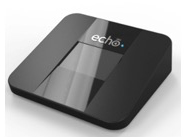
The Echo360 Pod is a device that records and stores your recordings. It is hidden inside the lectern.
Lectures will be recorded on the Echo360 Pod device installed in the lectern. These are not for faculty use, so don't ever touch, plug, or unplug anything. They remain inside the lectern and store all recordings for up to two weeks. When the scheduled recording finishes, it automatically uploads for processing and storage on the web. Nothing is stored locally here on campus at CSU, except the POD recordings that stay in the Pod for two weeks as backups, then get erased over.
Microphones
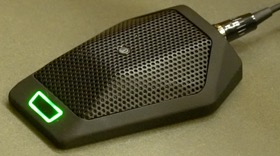
Boundary Mic
Most Echo360-equipped classrooms now have a microphone permanently installed in each room.
Boundary Mic: You are recorded from a boundary mic installed and sitting on the lectern. You must stay within about 5 feet for the best quality audio quality for Echo360 recordings.
Lights: A red light means the Boundary mic is muted. A green light means it is ready to record. Press the button to turn it to green if necessary. Leave it on green when finished please.
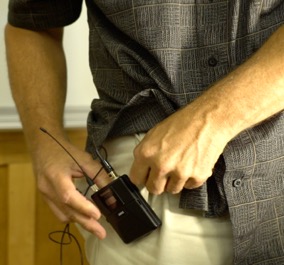
Belt Pac, Lavaliere Mic
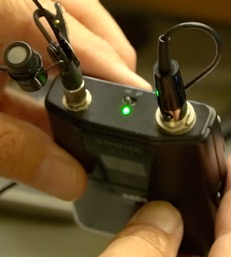
Green light must be on when recording for Echo360
Lavaliere Mic/Belt Pac: A few rooms still only have the Lavalier/Belt Pac type mic.
- Clip on outside of a pocket or belt.
- A green light must be on to record in Echo360.
- Be gentle with the cords. Never bend or wind them. Leave them loose on the surface of the lectern.
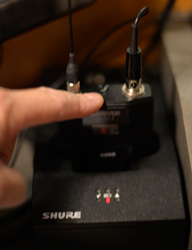
Belt Pac in charging cradle.
Red light indicates mic is charging.
Charging Cradle: These microphones will typically be located in a charging cradle located on the lectern.
- The mics in the charging cradles for the most part are now for voice lift only.
- When done, switch off the mic, place it in the charging cradle facing forward, and press firmly.
- The red light should turn on, indicating the mic has started charging for next user.
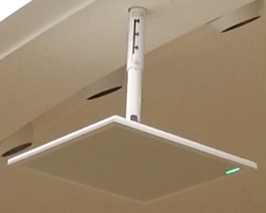
Ceiling MicNo Boundary or Lav mics present? Look up.
Ceiling Mic: In Clark A206, ENGRG B2, ENGRG B4, VTH A221, and VTH B213, each has a microphone system permanently mounted in the ceiling. A clip-on lavaliere microphone is not needed when recording in these classrooms.
Mic Checkout: Most rooms no longer require you to check out a microphone prior to class. However, there are a few exceptions.
- When using CHEM A101 and CHEM A103, you must check out a microphone prior to each class from the Chemistry Department office.
If a microphone is missing, call the Morgan Library Help Desk: (970) 491-5920.
Related Articles